SSIS still works. I say that first because I hear the opposite at almost every community event I attend. SSIS often gets lumped in with legacy ETL tools, but what changed is the platform around it. In March 2026, Microsoft announced a preview feature that runs existing SSIS packages inside Fabric pipelines. An SSIS to Fabric Data Factory migration no longer has to start with a rewrite.
It still has to start with a plan. Somewhere in your environment, a package nobody has opened since 2019 still loads the finance warehouse every night. These are the six questions I would answer before it moves.
Is SSIS going away?
No. SSIS 2025 reached general availability at Microsoft Ignite, and Microsoft's Fabric blog describes SSIS as a cornerstone of enterprise data integration. The release adds Microsoft.Data.SqlClient, TLS 1.3, Microsoft Entra ID authentication, and strict encryption.
Supported does not mean nothing changes. According to Microsoft Learn, SSIS 2025 removes the Microsoft Connector for Oracle, the Attunity change data capture components for Oracle, and the Hadoop tasks. It deprecates 32-bit mode, the SqlClient Data Provider connection type, and the legacy Integration Services Service.
The SQL Server version underneath matters too. SQL Server 2016 extended support ended on July 14, 2026, and SQL Server 2017 follows on October 12, 2027. If your SSIS server runs on either one, the upgrade is already on your calendar. The useful first step is a list of every package that uses a removed or deprecated component, built before anyone schedules that upgrade. A package that depends on the Oracle connector is far easier to fix in a planning meeting than on upgrade night.
What does an SSIS to Fabric Data Factory migration look like today?
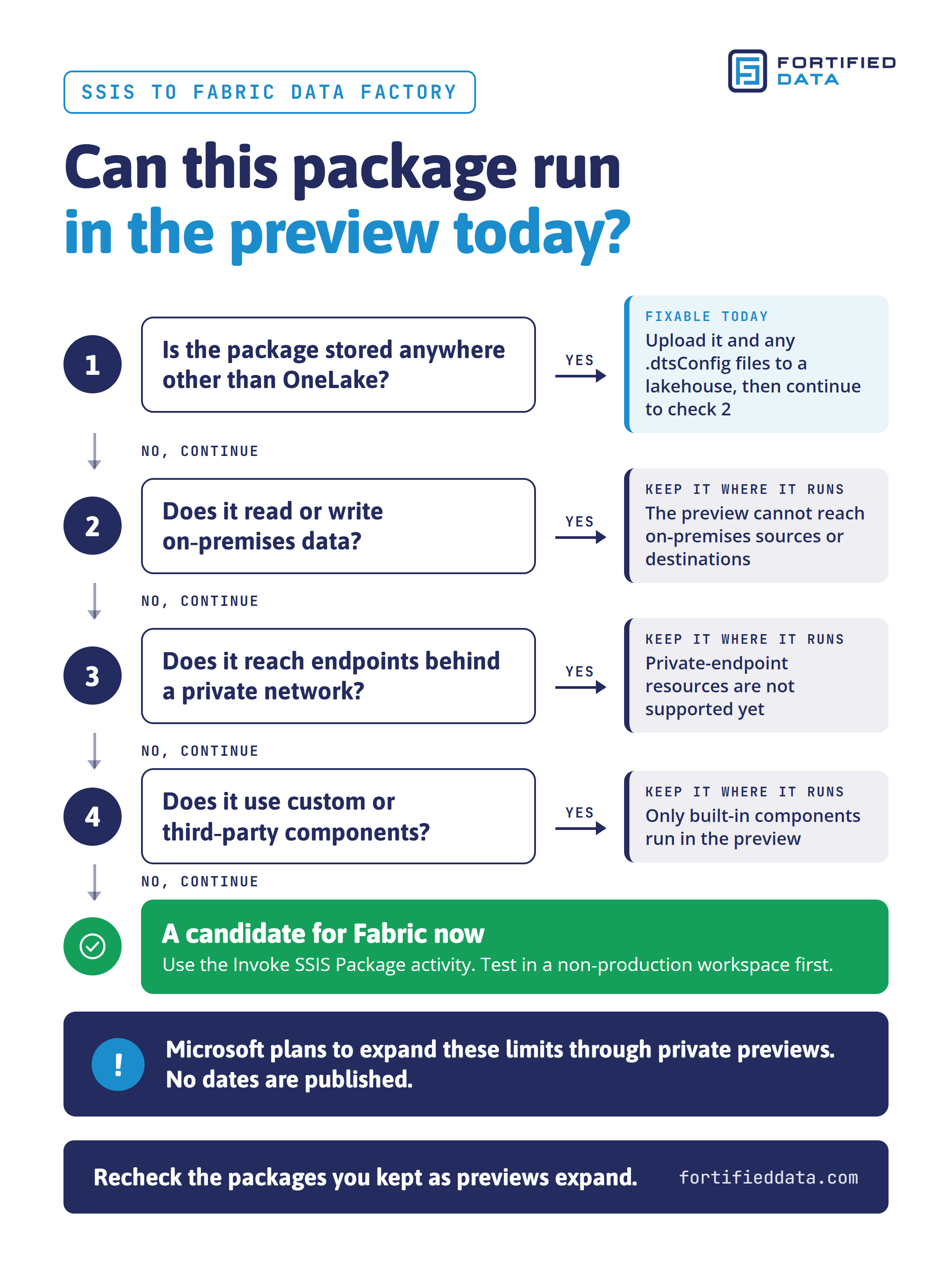
The Invoke SSIS Package activity runs existing SSIS packages from a Fabric Data Factory pipeline. The control flow and data flows carry over without a rewrite, and there is no integration runtime to provision. You upload the .dtsx file, and any .dtsConfig files, to a lakehouse in OneLake. Then you add the activity to a pipeline. Connection strings, credentials, and variables are set at runtime from pipeline parameters or expressions.
Microsoft calls it lift and shift, and for the right packages it is. During the preview, packages must be stored in OneLake. The activity cannot connect to on-premises data sources or destinations, or to endpoints behind private networks. It does not support custom or third-party components. Many SSIS packages pull from an on-premises SQL Server or a file system share, or rely on a third-party component suite. Those packages cannot run in the preview today.
Microsoft says on-premises connectivity and custom component support will arrive through a series of private previews, and it has not published dates. Andy Leonard, a longtime SSIS and Data Factory trainer, made the right point in April. Weigh the preview status before you write the activity into a 2026 roadmap.
Which packages should you keep, move, or rebuild?
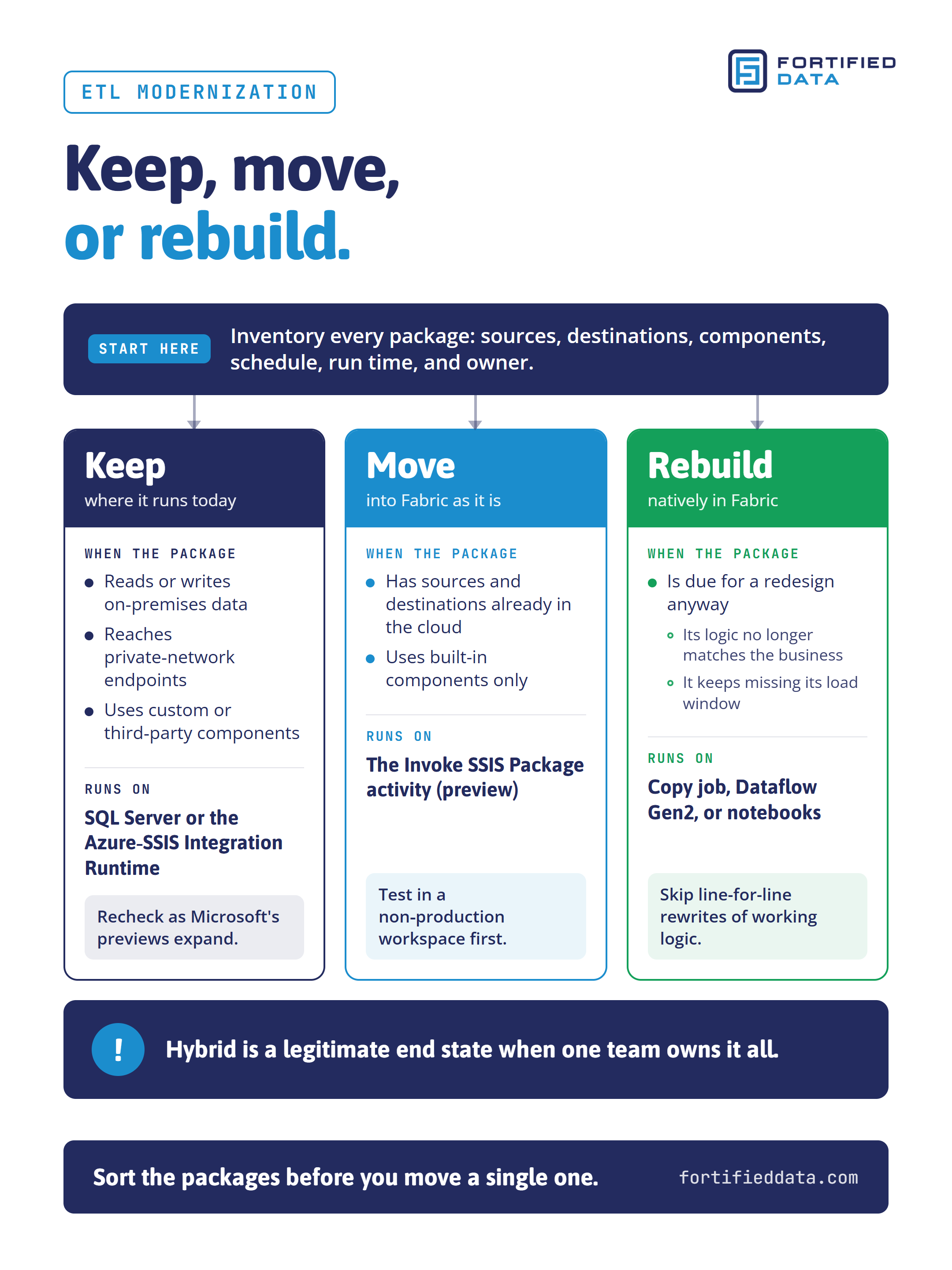
This is where ETL modernization happens, and it starts with an inventory. For every package, list its source and target systems, its components, its schedule, its run time, and the person who answers when it fails. Most teams I meet can produce half of that list. The other half lives in the head of someone who may have moved on.
Then sort each package into one of three lanes.
Keep the packages that depend on on-premises sources, private networks, or third-party components where they run today, on SQL Server or the Azure-SSIS Integration Runtime (IR). Recheck them as the previews expand.
Move the packages with cloud sources and targets and only built-in components to the Invoke SSIS Package activity. Test them in a non-production workspace first.
Rebuild natively in Fabric, with Copy job for data movement, Dataflow Gen2, or notebooks, only when a package is due for a redesign anyway. Its logic no longer matches the business, or it keeps missing its load window. Rewriting working logic line for line spends money without changing the outcome.
Hybrid is a legitimate end state. Microsoft's announcement describes data pipelines that mix SSIS packages with native Copy, Dataflow Gen2, Notebook, and Stored Procedure activities. That works as long as one team owns the whole picture.
I once built a cloud-based ETL process that brought more than 200 source systems into one central data warehouse. At that scale, the inventory was the project. It is also the cheapest part of any migration to get right, and the most expensive part to discover halfway through.
What if your SSIS migration to Azure is already done?
Many teams completed an SSIS migration to Azure years ago. Their packages run on the Azure-SSIS IR in Azure Data Factory, with the SSIS catalog hosted in Azure SQL Database or Azure SQL Managed Instance. That runtime still works, and it can already reach on-premises data, which the Fabric preview cannot.
Microsoft's planning guide for moving from Azure Data Factory to Fabric Data Factory, updated October 5, 2026, still describes running SSIS packages through ADF pipelines and calling those pipelines from Fabric. For other pipelines, it recommends replacing self-hosted integration runtimes with on-premises data gateways.
The Azure-SSIS IR bills while it is running, whether or not a package is executing. Teams often leave it on around the clock so a 2 a.m. job never hits a cold start. For some workloads, that is an expensive habit.
Pull last month's runtime hours and compare them with the hours packages actually ran. If the runtime sat idle most of the night, that gap is money you can recover before Fabric is even part of the conversation.
What will the SSIS runtime in Fabric cost, and who owns it?
The Invoke SSIS Package activity draws on your Fabric capacity. Microsoft Learn lists the meter at 1.35 capacity unit (CU) hours per vCore of SSIS uptime, with a fixed 4 vCores per workspace during the preview. Uptime runs while any SSIS activity is running, plus a fixed 30 minutes after the last one finishes. That comes to 5.4 CU hours for every hour the runtime is up, before pipeline and OneLake charges.
Schedule design is now a cost decision, and it needs an owner who knows which capacity pays for it. Ten short packages scattered across the day can each restart the runtime and hold it for another 30 minutes. Batched into one load window, they share one startup and one 30-minute tail.
Credentials need an owner too. Packages saved with the DontSaveSensitive protection level do not store passwords, so the pipeline supplies them at runtime. Fabric Data Warehouse and Fabric SQL database targets expect Microsoft Entra ID authentication. Decide up front where secrets and identities live.
What should ETL modernization deliver to the business?
Leadership cares about outcomes, not tooling:
- Cost avoidance: no rewrite budget spent on packages that work, and no emergency project when an upgrade hits the removed Oracle connector.
- Cost control: SSIS runtime hours matched to real load windows, and no integration runtime billing all night for one 2 a.m. job.
- Security and stability: credentials supplied at runtime, Entra ID authentication for Fabric targets, and no 32-bit or deprecated connection types left in production.
- Performance that scales with the business: load windows that still finish on time as sources and data volumes grow.
- Continuous optimization: fewer packages to maintain at each review cycle, and a documented roadmap for the rest.
Fortified Data's database practice has supported mission-critical healthcare, financial services, and retail environments for more than 20 years, with a 100% onshore team of experienced DBAs and principal consultants. If a partner cannot show you these outcomes from real ETL projects, a migration slide deck is all you are buying.
Six questions before you move a single package
- Which of our packages would break on SSIS 2025?
- Which of our packages can run in the Fabric preview today, and which cannot?
- Do we have an inventory of every package, with its sources, components, owner, and schedule?
- How many hours a month does our Azure-SSIS IR run, and how many of those hours is it idle?
- How many hours a day will the SSIS runtime in Fabric be up, and which capacity pays for it?
- Can our team or partner show these five outcomes from real ETL projects?
A successful SSIS to Fabric Data Factory migration starts with those answers, not with the tooling. If you want help building the inventory or sorting your packages, talk to our business intelligence consulting team.
Sources
- Use the Invoke SSIS Package activity to run an SSIS package (Preview), Microsoft Learn
- Invoke SSIS Package Activity in Microsoft Fabric (Preview), Fabric Updates Blog, March 2026
- What's New in SQL Server 2025 Integration Services, Microsoft Learn
- The Evolution of SQL Server Integration Services (SSIS): SSIS 2025 (Generally Available), Fabric Updates Blog
- Upgrade planning for Azure Data Factory to Fabric Data Factory, Microsoft Learn, updated October 5, 2026
- SQL Server 2017 lifecycle, Microsoft Lifecycle
- Microsoft Just Made SSIS-to-Fabric Easier, Andy Leonard, April 2026