Key takeaways: SQL Server 2016 end of support arrived on July 15, 2026, when Microsoft ended extended support for every edition. For SQL Server 2008, 2012, and 2014, moving to an Azure virtual machine included free Extended Security Updates (ESU) coverage. For SQL Server 2016, it no longer does. Staying on SQL Server 2016 now means paying for ESUs, which Microsoft estimates at approximately 75% of the on-premises license cost per year, covering Critical-rated security fixes only, through July 17, 2029. The lasting options are an upgrade to SQL Server 2022 or 2025, or a migration to Azure SQL Managed Instance or Azure SQL Database.
2016 was a great year. I was in the Microsoft MVP program, and I had just joined a couple of friends of mine on this wild ride we now call Fortified Data. It was also the year SQL Server 2016 shipped. SQL Server 2016 was a good release: Query Store, Always Encrypted, temporal tables. Plenty of the servers built on it that year are still carrying production workloads today, quietly and without complaint. That quiet is the problem.
So what is the big deal? SQL Server 2016 left the station on July 15, and nothing broke that day. The jobs ran and the monitoring stayed green. What changed was the price and the risk of leaving things alone, because Microsoft no longer releases free security patches for the version. For three end-of-support cycles in a row, Microsoft gave organizations a free way to wait. With SQL Server 2016, it stopped.
For the first time, waiting on Azure isn't free
When SQL Server 2008, 2012, and 2014 reached end of support, there was a well-worn way out. Lift the workload onto an Azure virtual machine and the Extended Security Updates came at no extra charge. A lot of organizations took that deal. The workload moved as it was, and the security updates moved with it.
Microsoft's current guidance is direct about the change. SQL Server 2014 customers still receive free ESUs on Azure VMs. SQL Server 2016 customers can subscribe to ESUs on Azure VMs and Azure VMware Solution, but they "aren't eligible for free ESUs." Everywhere else, the path runs through Azure Arc, which is free to connect and offers a pay-as-you-go ESU subscription, or through volume licensing with Software Assurance.
If your plan assumed a free Azure SQL Server 2016 ESU, rebuild the numbers before anyone signs a renewal. Organizations that do pay for SQL Server 2016 Extended Security Updates should know exactly what they're buying. Our SQL Server upgrade guide walks through the mechanics of in-place and side-by-side upgrades if you want to see what the alternative involves.
What an Extended Security Update actually buys you
Let's be precise about what the money gets you, because the name promises more than the product delivers.
Microsoft describes ESUs as a way to keep a server and its applications as-is for up to three years, and in the same guidance notes the option can be costly: approximately 75% of the on-premises license cost, every year. Across the full term, the cost of staying on SQL Server 2016 is more than twice what your SQL Server license cost in the first place, spent entirely on standing still. Your own SQL Server 2016 ESU cost depends on edition, core count, and licensing agreement, so ask for it in writing before you budget.
Coverage is also narrower than most people assume. ESUs deliver security fixes rated Critical by the Microsoft Security Response Center. They don't include new features, functional improvements, non-security bug fixes, or fixes you request. An instance on ESUs is not a supported instance that happens to cost more. It is unsupported software receiving only the most serious fixes.
At Fortified Data, our line is that we don't just apply a band-aid (Moms and Dads already do a great job at that), we fix. ESUs keep the worst holes closed while the underlying condition, an engine version Microsoft has stopped developing, stays exactly where it was. That is a holding measure. It can be the right one for a defined period. It is rarely the right long-term answer.
Your SQL Server 2016 options, compared
| Option | ESU cost | Security coverage | What it buys you | Best fit |
|---|---|---|---|---|
| Upgrade to SQL Server 2022 or 2025 | None needed | Full support on a current version | A long, well-defined runway | Workloads that need to stay on-premises or on VMs |
| Migrate to Azure SQL Managed Instance or Azure SQL Database | None needed | Maintained by the platform | An exit from the version cycle, traded for a consumption cost model | Workloads that pass compatibility testing for platform services |
| Stay on SQL Server 2016 with paid ESUs (Azure Arc or volume licensing) | Approximately 75% of license cost per year, per Microsoft | Critical-rated fixes only, through July 17, 2029 | Time | A funded, dated migration already underway |
| Move SQL Server 2016 to an Azure VM as-is | Paid; no longer free for 2016 | Same as above, if subscribed | A new host on the same version | Rarely the right answer this cycle |
| Do nothing | None | None | Nothing | Hard to defend to an auditor |
For most organizations the honest answer is a mix. A reporting server with no vendor constraints might move to Azure SQL Managed Instance, while a line-of-business database tied to a vendor's certification matrix gets a SQL Server 2016 to 2022 upgrade in place. Another might be better served by a SQL Server 2016 to 2025 migration onto new hardware. Let the compatibility testing make that call.
SQL Server 2016 is one date on a longer calendar
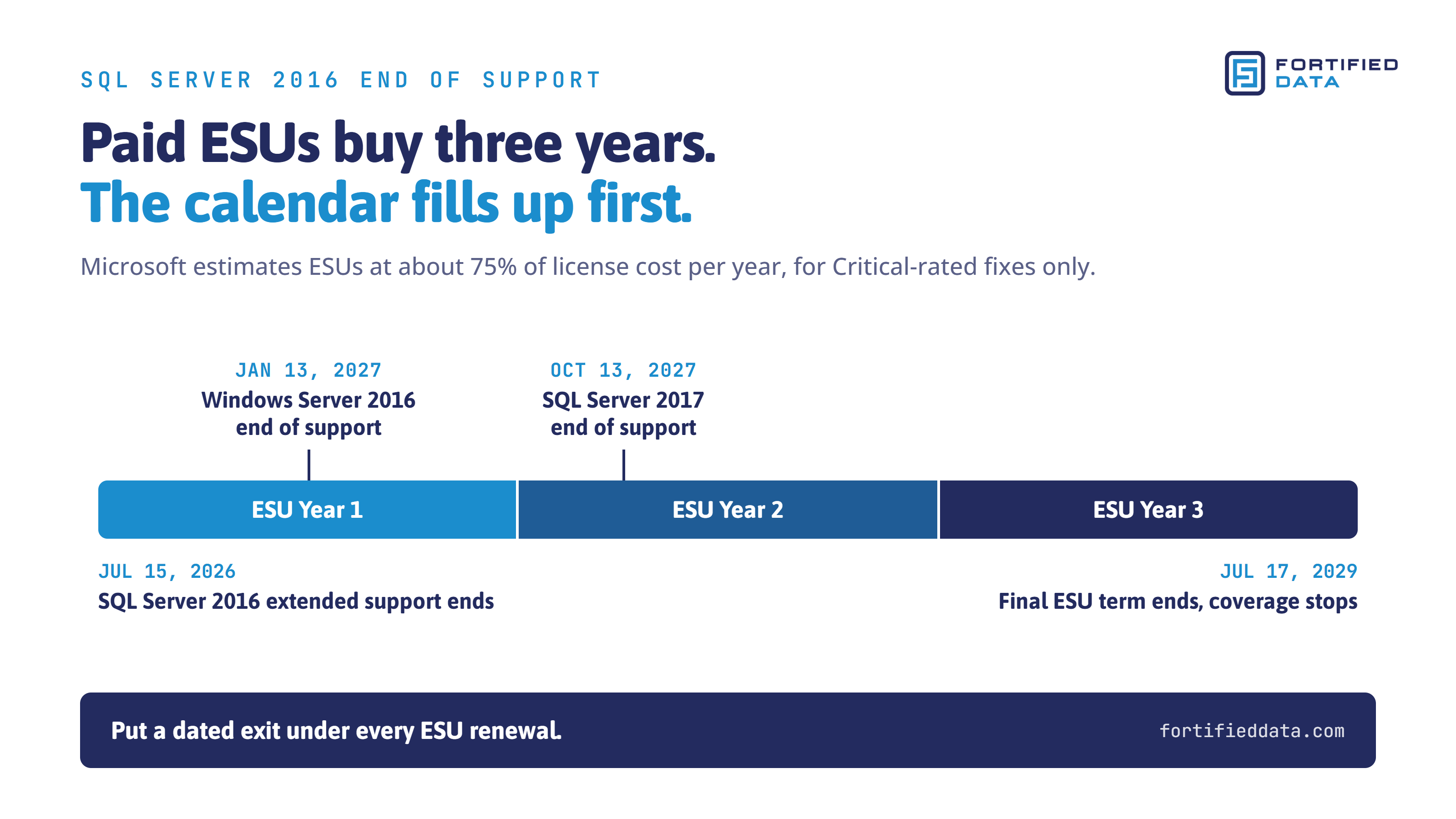
Windows Server 2016, the operating system underneath many SQL Server 2016 instances, reaches end of support on January 13, 2027. SQL Server 2017 follows on October 13, 2027. The free ESU window for SQL Server 2014 on Azure closes in July 2027. An organization that treats each of these as a separate emergency will be back at the same table three more times before the end of 2027.
Older versions of SQL Server will keep reaching these dates on a published schedule. That is why version currency belongs inside how a database environment is run every quarter, rather than in a project that appears when a date gets close. For our Select and Signature clients, the Fortified Data Strategic Improvement Plan means that each review cycle, the team remediates the highest-impact condition it has identified, and an engine version with a published end date is about the most predictable condition there is. It belongs on the plan as a line item, with a date and an owner.
A migration plan that doesn't rest on one person
Most organizations still running SQL Server 2016 aren't there out of neglect. More often there is one DBA, or a generalist covering several platforms, who knows exactly which applications are holding the version back and hasn't had a free quarter to deal with it. That person isn't the problem. They are usually the one who waved the flag first.
A workable SQL Server 2016 migration strategy has four steps:
- Inventory every SQL Server 2016 instance. Include the staging, reporting, and "temporary" servers that became permanent. Record edition, core count, and the applications each one serves.
- Test compatibility against the target. SQL Server 2022, SQL Server 2025, or Azure SQL Managed Instance, plus what each application vendor will certify. This step almost always takes the longest.
- Decide instance by instance. Upgrade, migrate, or bridge. The bridge decision is the critical one. If you bridge with ESUs, put an end date and a funded migration underneath it, or you will end up having a more expensive discussion another few years down the road.
- Execute in waves, with a baseline. Capture performance metrics before cutover so you can show the new version is better, more cost-effective, and lower risk, not just newer.
If SQL Server 2016 were a car, it would be a well-kept 2016 luxury sedan. There's nothing inherently wrong with it, but it predates modern safety systems, advanced navigation, driver-assist technology, fuel-efficiency improvements, and the intelligent features people now expect from a vehicle. Continuing to pay for Extended Security Updates is like paying thousands of dollars each year to keep that aging car on the road while still missing out on everything that's been invented over the last decade. SQL Server 2016 may still be running, but organizations that remain on it are paying more to get less: fewer capabilities, greater risk, increasing technical debt, and none of the innovations that make modern data platforms faster, safer, and more efficient.
If that work needs more hands than your team has right now, our database upgrade and migration team works alongside your DBA rather than around them, with a 100% U.S.-based team covering SQL Server as well as the Oracle, PostgreSQL, and MySQL systems that often sit next to it.
Waiting now has a price
SQL Server 2016 still runs, but the free way to wait is gone, and every month on ESUs without a dated exit is money spent standing still. If you'd like a second set of eyes on your SQL Server 2016 plan, talk to our team.
Not ready for a conversation? Take our free Database Health Score. It takes about five minutes and requires no access to your systems.
Sources
- Microsoft Learn, SQL Server 2016 lifecycle: https://learn.microsoft.com/en-us/lifecycle/products/sql-server-2016
- Microsoft Learn, What are Extended Security Updates? (SQL Server): https://learn.microsoft.com/en-us/sql/sql-server/end-of-support/sql-server-extended-security-updates
- Microsoft Learn, End of support options (SQL Server): https://learn.microsoft.com/en-us/sql/sql-server/end-of-support/sql-server-end-of-support-overview
- Microsoft Learn, Windows Server 2016 lifecycle: https://learn.microsoft.com/en-us/lifecycle/products/windows-server-2016
- Microsoft Learn, SQL Server 2017 lifecycle: https://learn.microsoft.com/en-us/lifecycle/products/sql-server-2017