The European Microsoft Fabric and SQL Community Conference wrapped up in Barcelona this fall, and Joey D'Antoni counted more than 200 Fabric announcements in his Redmond Magazine recap on October 2, 2026. Tucked inside that list is the news I have been waiting for: real levers for Microsoft Fabric cost control, and for how work moves into production.
I have spent more than a decade building data warehouses and Power BI solutions, and I love a good release. New levers are good news, but they do not pull themselves. Most of these features are in preview. Each one needs a decision and a person who owns it. Here is what changed, what it means for your bill and your release process, and what I would test first.
What did Microsoft change for Microsoft Fabric cost control and deployment?
Two items are generally available. Capacity Overview Events in Real-time hub now fire when a capacity is paused, resumed, or hits throttling conditions. The Power BI Project (PBIP) file format finally reached general availability in September.
The rest are in preview. That list includes zero-provisioned F0 capacity with on-demand billing, Capacity Operation Events, the Item Creation Policy, deployment plans, and the branch workspace admin profile. On the Azure SQL side, Hyperscale serverless auto-pause also entered public preview on September 29.
A preview feature can still change before release. A good plan sorts the announcements into "adopt now" and "test first" before anyone changes a capacity setting.
Is F0 capacity cheaper for your workloads?
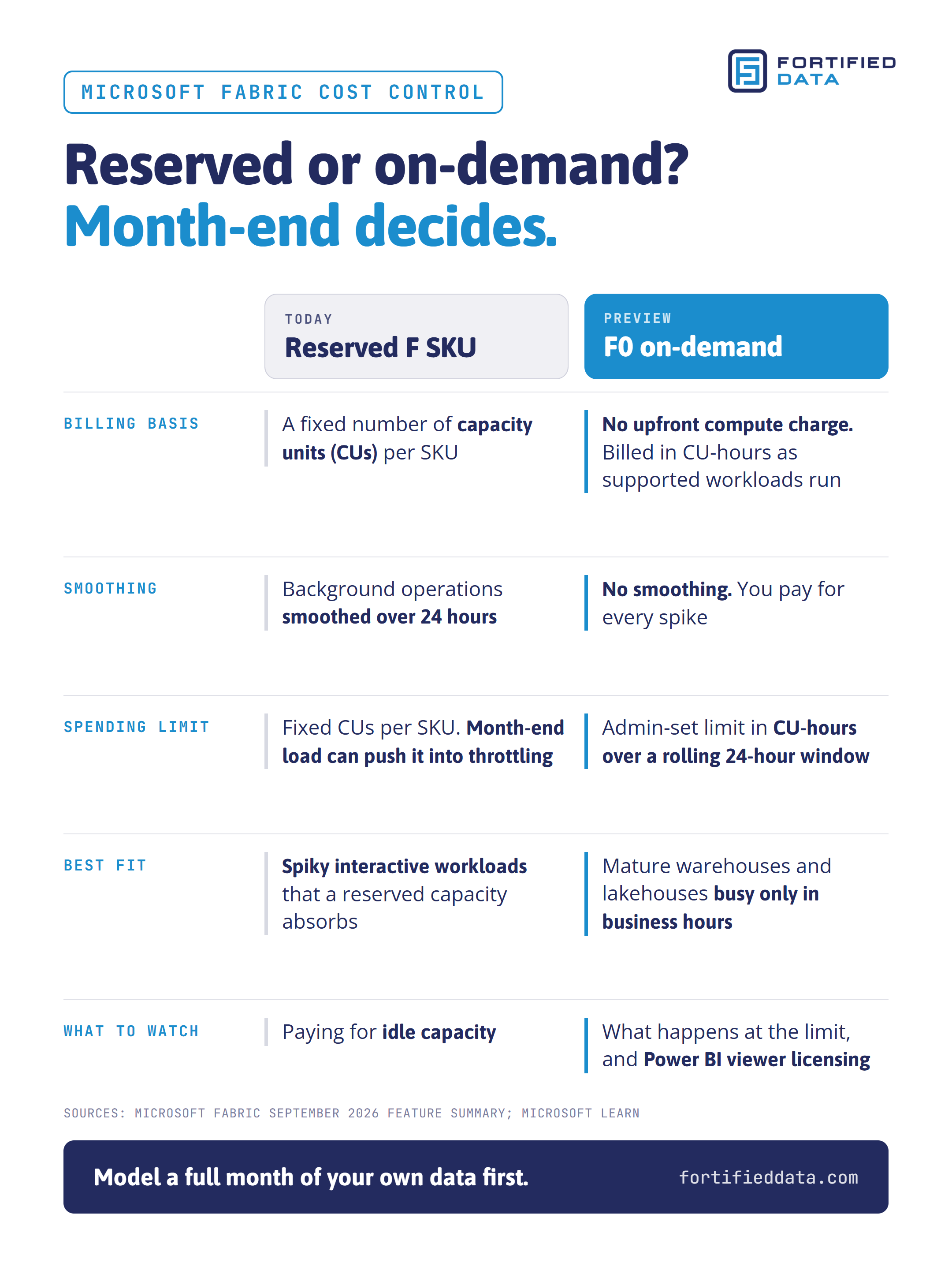
Today, every new Fabric purchase is an F SKU, and each capacity SKU carries a fixed number of capacity units (CUs). That is the compute power every Fabric workload draws on. Fabric smooths background operations over 24 hours, according to Microsoft Learn. A large overnight job borrows against the whole day instead of tripping a throttle at 2 a.m.
Fabric F0 capacity works differently. Microsoft describes it as a zero-provisioned SKU with no upfront compute-capacity charge. Supported workloads are billed in CU-hours as they run. Administrators set a spending limit in CU-hours over a rolling 24-hour window. Usage appears on a new "On-demand compute" tab in the Fabric Capacity Metrics app.
Here is the catch. On-demand consumption is measured without smoothing. Joey sees a fit for mature Fabric workloads, such as data warehouses and lakehouses that are busy only during business hours, and I agree. Spiky interactive workloads are different. A reserved capacity absorbs those spikes today, and on F0 you pay for each one.
Before you switch, run the numbers. Pull a full month of your own data from the Capacity Metrics app, month-end included, and see what F0 would have cost. Then decide ahead of time what the business expects to happen when the spending limit is reached.
Capacity is only part of the bill. OneLake storage is billed separately from compute, and user licensing depends on the SKU. On F SKUs smaller than F64, people who view Power BI content need a Pro or Premium Per User license, according to Microsoft Learn. Confirm how that rule applies to F0 before you move a Power BI report. A trial capacity will not settle capacity sizing either, because trial usage rarely includes a real month-end.
Who is allowed to spend your Fabric capacity units?
Joey put his finger on a problem I hear about constantly. A user with contributor access to a workspace can create any item type. Administrators are often surprised by the consumption that follows. Nobody did anything wrong. A new notebook, data warehouse, or semantic model simply lands on a capacity that nobody sized for it, and capacity usage climbs for every workload on it.
Two updates change fabric capacity management here. The Item Creation Policy lets capacity administrators control who can create specific Fabric item types in workspaces on their capacity. Capacity Operation Events report one event per operation that consumes capacity. Each event names the workspace, the item, CU consumption, duration, and throttling delay.
Picture a month-end refresh that pushes a capacity into throttling. Until now, many teams learned about it from a frustrated finance user. With these events, the alert can name the item and the workspace before the complaint arrives. Good fabric capacity management means a named owner receives those events. It also means a documented first response and a short list of who may create resource-heavy items on production capacity. Without that, your users are doing the monitoring.
How should Microsoft Fabric deployment work now?
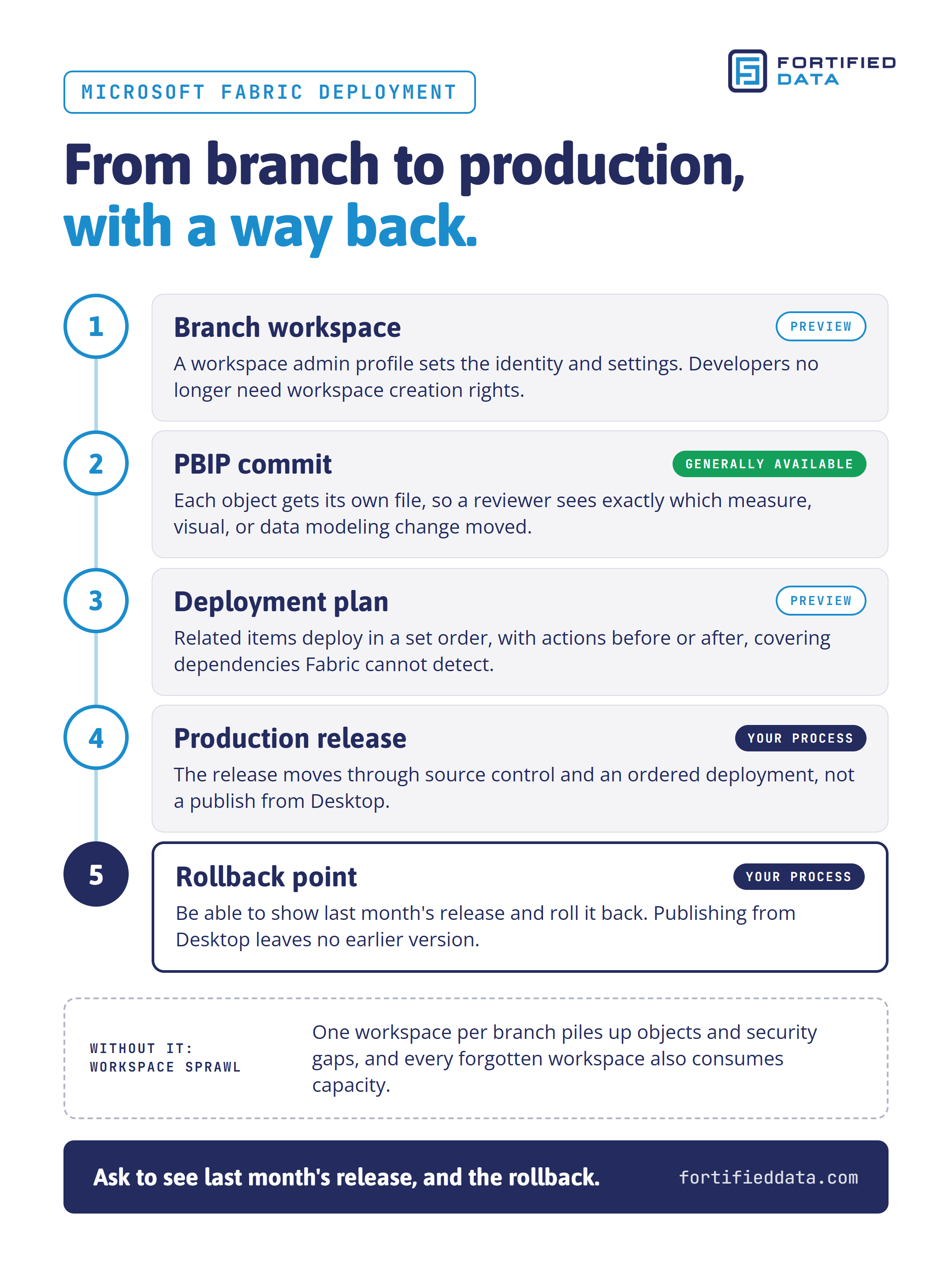
Start with the file format. A PBIX file is a single binary, so source control can tell you that something changed but not what. PBIP gives each object in a Power BI project its own file, so a reviewer can see exactly which measure, visual, or data modeling change moved. As a trainer, I will say it plainly: if your team is not saving in PBIP yet, start there.
Two preview features build on that foundation for Microsoft Fabric deployment. Deployment plans are a new workspace item. Teams arrange related items into ordered sets on a visual canvas and add actions that run before or after deployment. That covers the dependencies Fabric cannot detect on its own. The branch workspace admin profile lets a workspace admin define the identity and settings used when a developer branches out to a new workspace. Developers no longer need workspace creation rights.
That second one addresses the workspace sprawl Joey describes, where one workspace per branch piles up objects and security gaps. Every forgotten workspace also consumes capacity. I once built an ETL process that fed a central warehouse from more than 200 source systems. At that scale, release order is not optional, and neither is a clean way back.
Which of these updates belong in production this quarter?
Adopt the generally available pieces now. Save new Power BI work as PBIP, and route Capacity Overview Events to the person who owns the capacity. Test the preview features in a non-production capacity first, with real workloads and real month-end volume.
Hyperscale serverless auto-pause belongs in that test plan. It pauses idle Hyperscale serverless databases after a minimum delay of 60 minutes. Development and test databases that sit idle overnight are the natural candidates. Production databases with strict response needs are not, because the first query after a pause waits for the resume.
Keep a simple list of every preview feature you are using: where it runs, who approved it, and what you will do if Microsoft changes it before general availability. And do not build plans around a release date Microsoft has not announced.
What should good Fabric cost control deliver to the business?
Features are the means. Leadership cares about what the data platform delivers:
- Cost avoidance: capacity purchased only when the data shows the need, and no emergency SKU upgrade because month-end throttled the finance reports.
- Cost control: spend that matches how each workload actually runs, with no idle reserved capacity once testing proves the savings.
- Security and stability: releases that move through source control and an ordered deployment with a rollback point, and no ungoverned workspaces.
- Continuous optimization: month twelve measurably better than month one, with lower CU consumption for the same reports and fewer throttling events.
Fortified Data's database practice has supported mission-critical healthcare, financial services, and retail environments for more than 20 years, with a 100% onshore team of experienced DBAs and principal consultants. If a partner cannot show you these outcomes from current clients, the dashboard is all you are buying.
Six questions before your next Fabric invoice
Take these to your next planning meeting:
- Which of the new updates are generally available, and which are preview?
- Which of our workloads did we model on F0, and what did month-end look like?
- When a throttling event fires, who receives it, and what do they do in the first hour?
- Can we show last month's release and how we would roll it back?
- Which preview features are we running today, and in which capacities?
- Can our team or partner show these four outcomes from real Fabric environments?
Microsoft Fabric cost control starts with those answers, not with a new SKU. If you want a second set of eyes before you test F0 or restructure your releases, talk to our Microsoft Fabric consulting team.
About the author
Angela Henry is a Principal Consultant in Fortified Data's Professional Services practice with more than 25 years of experience in data platform delivery, more than a decade of it focused on business intelligence. She works across the full Microsoft BI stack, on-premises and in Azure, and she holds Microsoft Certified Trainer status, which she puts to use teaching report authors to get the most from Power BI.
Sources
- Understand Microsoft Fabric licenses and capacity, Microsoft Learn
- Microsoft Fabric Updates Bring More Control Over Security, Deployment and Costs, Joey D'Antoni, Redmond Magazine, October 2, 2026
- Fabric September 2026 Feature Summary, Microsoft Fabric Community
- Understand capacity throttling and smoothing, Microsoft Learn
- Public Preview: Auto-pause and auto-resume for Azure SQL Database Hyperscale Serverless, Azure SQL Blog, September 29, 2026
- Power BI Project (PBIP) is now generally available, Redgate Simple Talk, September 29, 2026