A dashboard full of green "Synchronized" states feels reassuring, and it's easy to mistake for a disaster recovery plan. It isn't one. Always On availability groups failover testing is the only way to find out whether your environment can actually move production to another server and keep the business running. The stakes are real: in Uptime Institute's 2025 Annual Survey, 57% of respondents said their most recent major outage cost more than $100,000, and about one in five put it above $1 million. Uptime's 2026 outage analysis also found that failing to follow established procedures is still the leading driver of outages tied to human error.
A procedure nobody has rehearsed won't get followed under pressure. The questions below help separate an availability group that's configured from one that's proven.
What does an Always On availability group actually protect you from?
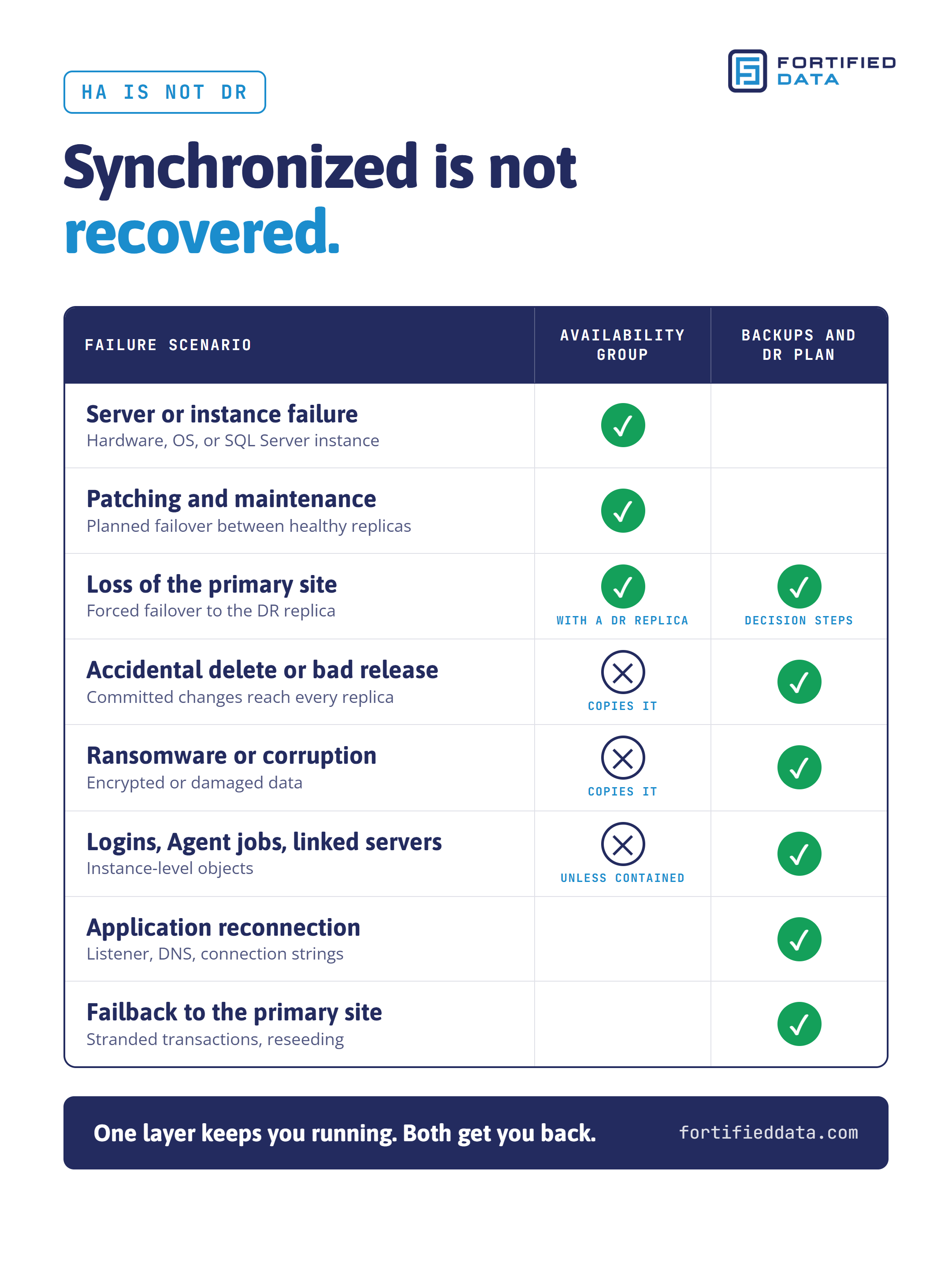
An availability group protects you when a server, an instance, or a whole site goes down. It keeps the secondary replicas in step with the primary, so a hardware failure or a patching window doesn't take the application offline. That's high availability, and it's genuinely valuable.
What it doesn't protect you from is bad data. Every committed change flows to every secondary, including an accidental DELETE with no WHERE clause, a faulty release, or ransomware that encrypts data over a legitimate connection. Getting back from those takes full and transaction log backups and restores you've actually tested. My colleague Chris Shaw covers that in Database Disaster Recovery Testing: Why Plans That Look Fine on Paper Still Fail.
A solid SQL Server HA/DR design treats high availability and disaster recovery as two separate layers. The availability group handles infrastructure failure, and backups handle data failure. The disaster recovery plan spells out how people use both, in what order, and who makes the call.
Which availability group failover does your testing actually exercise?
Microsoft documents three kinds of availability group failover. Automatic and planned manual failover both need a synchronized, synchronous-commit secondary, and neither loses data. Forced failover, which you run with FAILOVER_ALLOW_DATA_LOSS, is the only option when the target is an asynchronous-commit replica, and it can lose data.
This matters because most disaster recovery replicas run in asynchronous-commit mode. Over long distances, synchronous commit adds too much latency. So the failover you'll need in a regional outage is almost always a forced one, and it's the one most teams have never run.
A planned failover between two healthy nodes proves the least. It can't show you what happens when the primary site is gone, quorum is lost, and someone has to decide how much data the business can afford to lose.
A good test schedule includes a forced failover to the DR replica, with the decision steps written down. Before forcing, the team checks is_failover_ready in sys.dm_hadr_database_replica_cluster_states, then compares end-of-log LSNs to find the secondary that would lose the least data. If the primary site held the majority of the quorum votes, the team has to force quorum on the Windows Server Failover Cluster first.
What breaks after a failover that the dashboard does not show?
The availability group moves databases. It doesn't move what surrounds them. Microsoft is explicit that logins and SQL Server Agent jobs stay behind on the old server unless the databases are contained, and in practice the list of things left behind is longer than that.
SQL logins need matching security identifiers (SIDs) on every replica, or database users end up orphaned. Agent jobs, backup jobs included, have to exist on every replica and check whether they're running on the primary. Linked servers, credentials, Database Mail profiles, and server-level permissions all live at the instance level, not the database level. Contained availability groups, available in SQL Server 2022 and later, manage logins, permissions, and Agent jobs at the group level, but many production environments haven't adopted them yet.
Then there are the client connections. When a multi-subnet availability group listener is created through SQL Server (SSMS, Transact-SQL, or PowerShell), the default RegisterAllProvidersIP setting is 1, which registers all listener IP addresses in DNS.
Clients that don't specify MultiSubnetFailover=True in their connection strings typically attempt those IP addresses sequentially. If the inactive subnet's IP address is tried first, connection attempts can experience significant delays or timeouts.
Some teams set RegisterAllProvidersIP to 0 as a workaround for legacy clients that don't support MultiSubnetFailover=True. This registers only the active listener IP address in DNS, but introduces a different consideration during failover. With the default HostRecordTTL of 1200 seconds (20 minutes), clients may retain a cached DNS record for the previous IP address, potentially delaying reconnection until DNS information is refreshed.
Will the new primary perform like the old one?
This is the question I see skipped most often. The applications connect, but response times are several times worse, and a technically successful failover turns into a business outage anyway.
The causes are pretty predictable. The buffer pool on the new primary is cold, so early reads hit storage. The plan cache is empty, so every query compiles from scratch. Temporary statistics that the secondary built for read-only queries live in tempdb, and Microsoft's documentation notes they're lost when the primary fails over. Instance-level settings aren't part of the availability group either, so if the new primary has a different max server memory, MAXDOP, cost threshold for parallelism, tempdb layout, or trace flag set, the workload will behave differently. The DR server is also often sized smaller than production. That's reasonable, but only if someone has measured what the workload needs.
Capture a baseline before the test: wait statistics, top queries by CPU and duration, and storage latency. Then measure the same things on the new primary after failover. Query Store data lives inside the database, so it travels with the failover and lets you compare the same queries on different hardware. Compare instance configuration across replicas on a schedule, rather than discovering the differences during an incident.
Before go-live, Fortified Data runs a structured onboarding that reviews architecture, server health, configuration, capacity, and disaster recovery readiness. It also documents the agreed performance goals and monitoring baselines.
How do you run a forced failover test without risking production?
Testing a forced failover takes planning, not gambling with production. The options range from a test availability group built on the same cluster design, to a DR rehearsal with the application owners in the room, to a full site failover in a maintenance window.
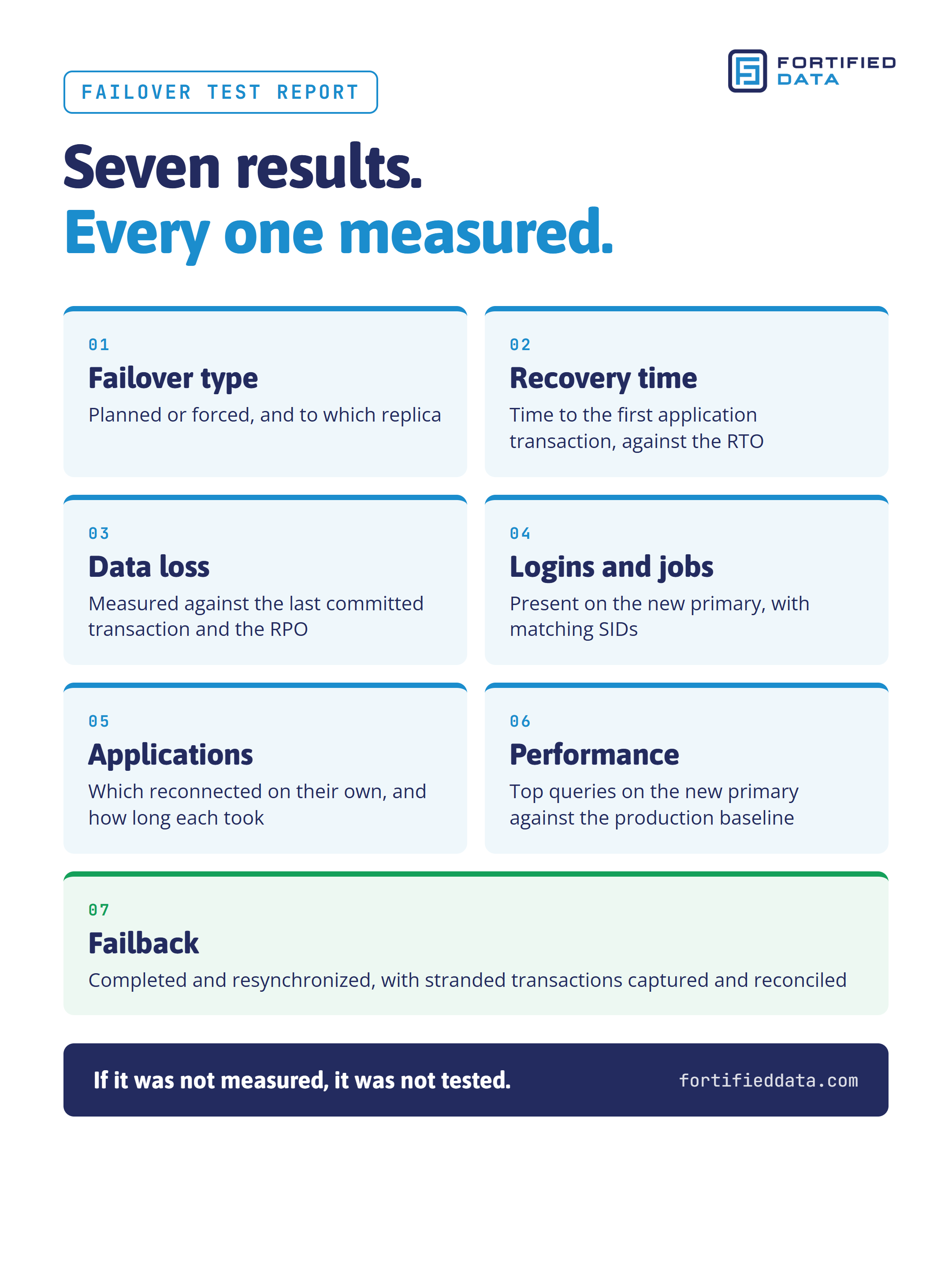
The test should produce numbers, not impressions. Record the time from declaring the disaster to the first successful application transaction, and measure data loss against the last committed transaction. Write down every manual step and every application that needed a nudge. And have a DBA other than the runbook's author run it exactly as written, because that's how the gaps show up.
Fortified Data plans and runs availability group failover tests with clients, from pre-checks through validation and failback. Each managed services client gets a POD, a dedicated DBA team that shares documentation and knowledge of the environment, so the runbook and the results belong to the team and not to one person.
Does your SQL Server disaster recovery plan include failback?
Failing over is only half the exercise, and coming back has its own risks. Microsoft documents that after a forced failover, the former primary rejoins as a secondary in a suspended state. When data movement resumes, any transactions that committed on the old primary but never reached the new one are rolled back to a common recovery point. They're gone unless someone captured them first, for example with a database snapshot, and reconciled them with the business.
Large databases may need reseeding, which can take hours. The way back is usually a planned failover, which means getting the replica into synchronous commit and fully synchronized first. It still needs a maintenance window, the same application checks, and the same performance comparison.
What does a tested SQL Server HA/DR posture deliver to the business?
Failover testing takes time from experienced people, so it's fair to judge it by what it returns:
- Cost avoidance: a regional outage that ends in a rehearsed failover instead of an emergency project. The Uptime figures above show how quickly a single major outage passes $100,000.
- Security and stability: dated evidence of measured recovery time and data loss, so you can answer auditors, insurers, and regulators with records instead of diagrams.
- Performance that scales with the business: a DR replica sized for today's workload and confirmed with real query measurements.
- Continuous optimization: each test should leave you with fewer manual steps and a shorter recovery time than the last. For Select and Signature clients after go-live, Fortified Data's Strategic Improvement Plan covers index strategy, performance, capacity, and data security. In each review cycle, the team fixes the highest-impact issue surfaced by telemetry and that plan, so account reviews track completed improvements and not just system status.
If a provider can't show you a measured failover test from your own environment, the availability group dashboard is all you're buying.
Proving your availability group before you need it
An availability group only becomes part of a disaster recovery plan once Always On availability groups failover testing has proven it works, with numbers. Put these seven questions to your team or your provider:
- Which failure scenarios does our availability group cover, and which depend on restoring from backup?
- When did we last force a failover to the DR site, and how much data did we measure as lost?
- After our last failover test, which applications reconnected on their own, and how long did each take?
- How did our top queries perform on the DR replica compared with production?
- Who ran our last failover test, and was it someone other than the runbook's author?
- What's our procedure for transactions stranded on the old primary, and how long did our last failback take?
- What has our SQL Server HA/DR posture delivered to the business, and can we see the evidence?
If you would like help planning a failover test or reviewing your SQL Server HA/DR architecture, talk with our team.
Not ready for a conversation? Take our free Database Health Score. It takes about five minutes and requires no access to your systems.
Sources
- Uptime Institute, Annual Outage Analysis 2026 press release (May 13, 2026)
- Microsoft Learn, Failover and Failover Modes (Always On Availability Groups)
- Microsoft Learn, Perform a Forced Manual Failover of an Availability Group
- Microsoft Learn, What Is a Contained Availability Group?
- Microsoft Learn, Configure availability group listener
- Microsoft Learn, Offload workload to secondary availability group replica (temporary statistics)