
Flexera’s 2026 State of the Cloud Report found that estimated waste in cloud infrastructure and platform spend rose to 29% this year. That is the first increase in five years. Managing cloud costs remains the top challenge for 85% of respondents. Your database estate sits inside that cloud bill through licensing, capacity, and the people who keep it running. It is rarely examined line by line. Database cost optimization seldom fails for lack of effort. It fails because the spend gets treated as a purchasing problem when it is really an operating one.
Renewals get negotiated. Cloud service tiers get compared. Meanwhile, the decisions that actually set the number are made on the ground, often by whoever is on call that week. Below are seven questions a finance or IT leader can put to their own team, or to a provider, along with what a strong answer and a weak answer sound like.
Where is your database spend actually going?
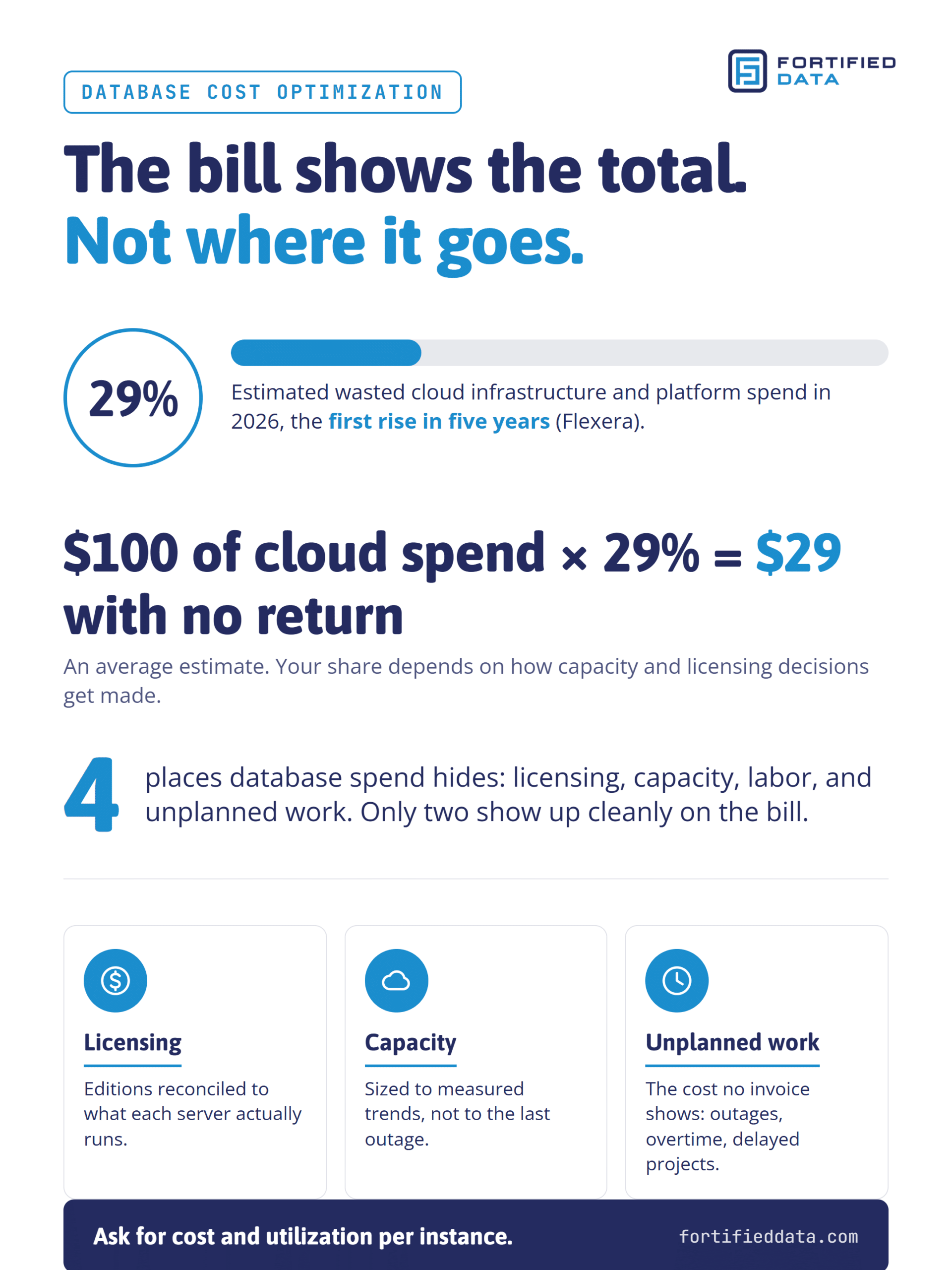
Most organizations can see the invoice. Far fewer can see what drives it. Database operating costs break into four buckets: licensing, cloud or hardware capacity, the labor to operate it, and unplanned work. Only the first two show up cleanly on a bill.
The FinOps Foundation’s State of FinOps 2026 survey of 1,192 practitioners points the same direction. For licensing, data center, and data platform spend, teams rank allocation, forecasting, and budgeting ahead of optimization. Understanding the cost comes before cutting it.
What good looks like is a baseline for each instance: what it runs, who depends on it, what it costs, and how busy it actually is. Ask your team: can you show me cost and utilization per instance, not just the total? A weak answer is “we look at it at renewal.”
At Fortified Data, structured onboarding is completed before go-live. The team reviews architecture, server health, configuration, capacity, and disaster recovery readiness, then documents agreed performance goals and monitoring baselines. That baseline becomes the starting line for every cost conversation after it.
Are you licensed for the estate you run today, or the one you had three years ago?
Estates change faster than license agreements. Servers get consolidated. Applications get retired. An Enterprise edition purchase made years ago for a single feature quietly renews every year. None of this is negligence. It is what happens when nobody owns the reconciliation.
SQL Server licensing rules also move. Microsoft’s documentation for SQL Server 2025 raises the Standard edition limits to 32 cores and 256 GB of buffer pool memory, up from 24 cores in earlier versions. For some workloads, that changes which edition fits, and the cost savings can be material. Whether a given server can move depends on which features it actually uses, and that is a specialist question, not a procurement one.
Version decisions carry cost too. SQL Server 2016 reached the end of extended support in July 2026, and Microsoft estimates Extended Security Updates at roughly 75% of the on-premises license cost per year. Staying put is now a line item. Our SQL Server upgrade guide walks through what the alternative involves.
Ask: when was our licensing last reconciled against what each server actually runs? A weak answer is “we renew whatever the reseller quotes.”
Is cloud database capacity bought on evidence or on caution?
In the cloud, overprovisioning is not a one-time purchase. It is a monthly charge that compounds. The pattern is familiar: a performance incident happens, someone moves the database to larger instance types to be safe, and nobody moves it back down. Flexera ties this year’s rise in waste to AI workloads and new services, which adds to that pressure across Azure, AWS, and Google Cloud alike.
What good looks like is cloud database capacity tied to measured trends and reviewed on a schedule. Growth gets forecast, so the business buys capacity when the data shows the need rather than months ahead of it. Steady workloads become candidates for reserved instances or similar commitments, which is only cost effective once the baseline is known. That is cost avoidance and performance that keeps pace with the business, from the same discipline.
Ask: what data supported our last tier change, and when did we last size anything down? A weak answer is “we bumped it up after the outage and left it.”
What does reactive database operations cost that never shows up on an invoice?
Earlier in my career, I worked on SITA aviation systems. Downtime there had a price per minute, and everyone knew the number. Most mid-sized companies have never calculated theirs, so reactive operations look free. They are not.
The hidden costs are real but scattered. Outage hours land on revenue and customer trust. Emergency consulting hours land on a different budget. Overtime lands on payroll. The modernization project that slipped a quarter because the team was firefighting never lands anywhere at all. Add them up and the “cheap” option is often the expensive one.
What good looks like is fewer recurring alerts, planned maintenance windows, and problems fixed at the root rather than restarted. Ask: what did unplanned database work cost us last year, including the projects it delayed? A weak answer is “we don’t track that.”
What does database FinOps discipline look like in practice?
Strip away the vocabulary and FinOps discipline is simple: every dollar has an owner, a forecast, and a reason. Applied to database operations, that means allocating cost to the workloads and business units that drive it, forecasting growth, and holding a recurring review that ends with a decision, not a report.
Flexera reports that 63% of organizations now have established FinOps teams. That is progress. In practice, though, FinOps tools and FinOps practices see the bill, not the database. They can tell you spend went up across your cloud environments. They usually cannot tell you which configuration, edition, or capacity choice caused it. Database finops works when finance visibility and database specialist judgment sit in the same review.
Fortified Data’s Strategic Improvement Plan, for Select and Signature clients after go-live, covers index strategy, performance, capacity, and data security. Each review cycle, the team remediates the highest-impact condition identified through telemetry and that plan, so account reviews track completed improvements, not just system status.
Ask: what changed in our environment since the last review, and what did it save or prevent? A weak answer is a status report full of green checkmarks and no completed changes.
What should reducing database spend deliver in business terms?
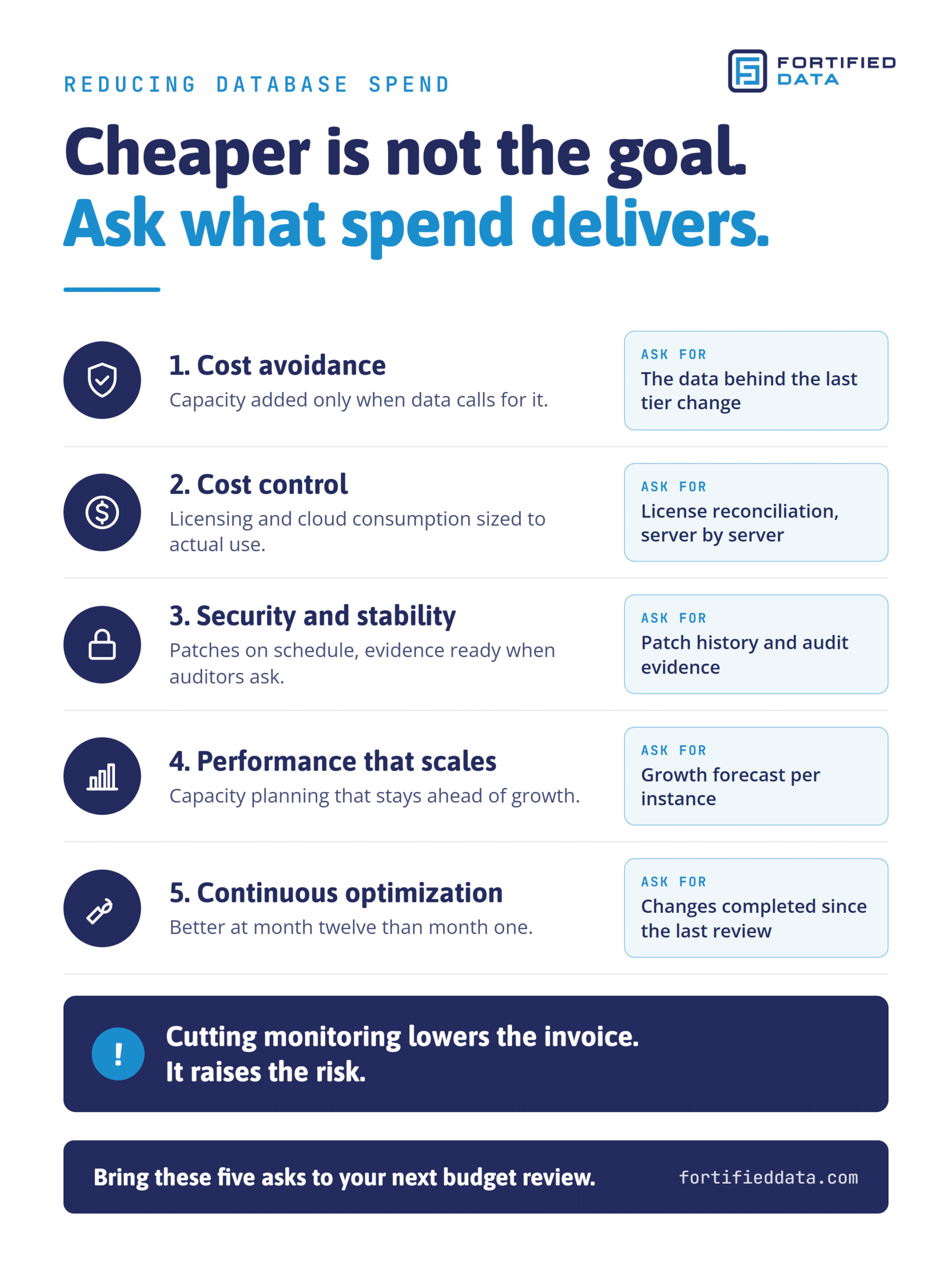
Reducing database spend is not the same as spending less this quarter. Cutting monitoring or deferring maintenance produces a reduced cost on paper and a higher risk in practice. The right measure is what the spend produces.
- Cost avoidance: the outage that never reaches customers, the emergency project nobody has to staff, and capacity added only when usage data calls for it.
- Cost control: a predictable monthly number in place of the cost of hiring, training, and keeping a full internal team, with licensing and cloud consumption sized to actual use.
- Security and stability: patches applied on schedule, configuration kept consistent, issues closed before users feel them, and evidence ready when the auditors ask.
- Performance that scales: capacity planning and tuning that stay ahead of growth in data, users, and transactions.
- Continuous optimization: an environment that is measurably better at month twelve than at month one, with fewer repeat alerts and a written roadmap for what comes next.
A provider who cannot point to these results in current client environments is selling visibility, not value.
Build versus buy: what does the coverage actually cost?
For an estate of 3 to 25 SQL Server instances, the internal alternative is usually one or two DBAs. Run the numbers fully loaded: recruiting, salary, benefits, training, and retention. Then add the part most comparisons leave out. One DBA cannot cover 24 hours a day, 365 days a year. When that person takes a vacation or resigns, your coverage goes with them.
A fair look at database total cost of ownership sets the fully loaded cost of the coverage you need against the managed service fee, not one salary against it. On that basis, a dedicated managed services team delivers round-the-clock coverage for less than the fully loaded cost of recruiting and retaining an internal team to do the same. Our breakdown of in-house versus managed service provider models goes further into the build versus buy trade-off.
At Fortified Data, each managed services client is assigned to a POD, a dedicated DBA team that shares documentation and knowledge of the environment, supported by a Strategic Account Manager. The team is 100% onshore and works 24/7 x 365, and every tier includes around-the-clock monitoring and alerting. Fortified Data also works through MSP and technology partners. In those engagements, the partner owns the broader relationship and its infrastructure, application, or security services, while Fortified Data delivers the database work.
Ask: what would it cost us, fully loaded, to staff 24/7 database coverage internally, and what happens when that person leaves? A weak answer compares a single salary to a monthly fee.
The seven questions to take into your next budget review
Database cost optimization starts with better questions, not a bigger discount. Before the next renewal or budget cycle, put these to your team or your provider:
- Where is our database spend actually going, instance by instance?
- Are we licensed for the estate we run today, or the one we had three years ago?
- Is our cloud database capacity bought on evidence or on caution?
- What does reactive database operations cost us that never shows up on an invoice?
- What does database FinOps discipline look like in our reviews, and does anyone with database specialist depth sit in them?
- What business outcomes is our database spend delivering?
- What would the same coverage cost us, fully loaded, if we built it ourselves?
If the answers are harder to find than they should be, talk with our team about what a clear baseline would show.
Sources
- Flexera, 2026 State of the Cloud Report (press release, March 18, 2026): https://www.flexera.com/about-us/press-center/flexera-finds-cloud-value-is-rising-while-ai-waste-grows
- FinOps Foundation, State of FinOps 2026: https://data.finops.org/
- Microsoft Learn, Editions and Supported Features of SQL Server 2025: https://learn.microsoft.com/en-us/sql/sql-server/editions-and-components-of-sql-server-2025
- Microsoft ESU guidance for SQL Server 2016, as cited in the 2026-09-22 Fortified Data end-of-support post